

How to transform data from rows to columns in a SQL Server query?
Follow this short and step by step tutorial to simply transform data and Pivot rows to columns in SQL Server. In other words, using the T-SQL PIVOT operator to convert lines of data into named columns.
Note that the syntax is not super straightforward, especially for beginners. Indeed, in order to work, the names of the target columns must be provided explicitly. And they must match the content of the pivoted column.
This simple Pivot query example shows how to build a first one and adapt it of course to your own needs, step by step. It simply moves the lines containing the months names to columns while computing the average amount of sales for each given month.
Table of Contents
1. Syntax of Operator to Pivot Rows to Columns in SQL Server
In the other hand, if we don’t want to have any aggregation in the new results lines, then we need exactly one line per column created. In the example below we do a pivot with an aggregation and we use the average function.
And only the six first months of the year are used and pivoted, namely January to June. It’s easy to extend to the end of the year by adding the next 6 months. To do so, just copy/paste the data creation and query, and add the missing months.
2. Create a SQL Server table to transform from rows to columns
Before building the query, create the sample table with this T-SQL script, simply copy and paste it to your SSMS window.
-- If table exits, drop it
IF exists( 	SELECT 	1 FROM sys.objects
            WHERE 	object_id = object_id(N'[dbo].[SALES]')
                AND type in (N'U') )
BEGIN
    DROP TABLE [dbo].[SALES]
END
GO

-- SALES table creation
CREATE table [dbo].[SALES] (
    [MONTH] NVARCHAR(20),
    [AMOUNT] NUMERIC(5)
)
GO

-- Insert first sales amount for each month
INSERT INTO dbo.SALES ( MONTH, AMOUNT ) VALUES ( N'January', 1000)
INSERT INTO dbo.SALES ( MONTH, AMOUNT ) VALUES ( N'February', 2000)
INSERT INTO dbo.SALES ( MONTH, AMOUNT ) VALUES ( N'March', 3000)
INSERT INTO dbo.SALES ( MONTH, AMOUNT ) VALUES ( N'April', 4000)
INSERT INTO dbo.SALES ( MONTH, AMOUNT ) VALUES ( N'May', 5000)
INSERT INTO dbo.SALES ( MONTH, AMOUNT ) VALUES ( N'June', 6000)

-- Insert second sales amount for each month
INSERT INTO dbo.SALES ( MONTH, AMOUNT ) VALUES ( N'January', 1100)
INSERT INTO dbo.SALES ( MONTH, AMOUNT ) VALUES ( N'February', 2200)
INSERT INTO dbo.SALES ( MONTH, AMOUNT ) VALUES ( N'March', 3300)
INSERT INTO dbo.SALES ( MONTH, AMOUNT ) VALUES ( N'April', 4400)
INSERT INTO dbo.SALES ( MONTH, AMOUNT ) VALUES ( N'May', 5500)
INSERT INTO dbo.SALES ( MONTH, AMOUNT ) VALUES ( N'June', 6600)

-- Check inserted data
SELECT 	*
FROM 	dbo.SALES;
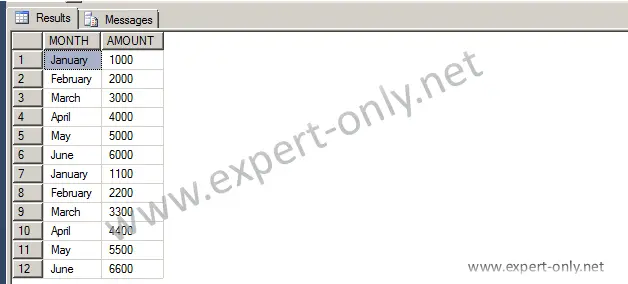
The SQL Server table to pivot is presented here in lines and 2 columns are available. The goal for the next step is to have each month with an average value of the sales.
3. Build and run the SQL Server PIVOT query with one fixed column
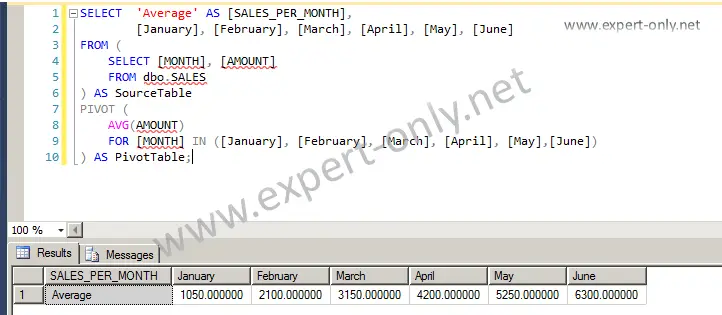
The query to pivot rows into columns is compound of these three parts, it computes the average sales per month:
- A selection of the aggregated column and the months, each column called explicitly.
- The sub-query with the original selection of data.
- The PIVOT itself using the AVG aggregation function.
SELECT 	'Average SALES' AS [SALES_PER_MONTH],
        [January], [February], [March], [April], [May], [June]
FROM (
    SELECT [MONTH], [AMOUNT]
    FROM dbo.SALES
) AS SourceTable
PIVOT (
    AVG(AMOUNT)
    FOR MONTH IN ([January], [February], [March], [April], [May],[June])
) AS PivotTable;
The result of the query appears in columns after the query using PIVOT.
About a simple query to Pivot Rows to Columns in SQL Server
To finish, this Transact-SQL tutorial explains how to Pivot Rows to Columns in SQL Server with a step by step example. This example only uses 2 queries.
To go further and query system tables metadata, use the MS SQL query to display the date and time of the last modification of a table. Of course you can also do the reverse operation to transpose columns into rows using the UNPIVOT operator. But also Pivot or Unpivot data manually with Excel…
More tutorials about how to Pivot and Unpivot data
- SQL Server PIVOT with Multiple Fixed Columns
- Tutorial to Pivot Excel table columns into rows.
- How to create an Excel pivot table to analyse data?


Be the first to comment